Rust promises zero-cost abstractions and blazingly fast performance, but when you're ready to build a web application, you quickly realize it's not "batteries included" like other languages, especially for the web. Unlike Go with its standard library HTTP server or Python with Django, Rust makes you choose everything: your web framework, database library, templating engine, and more.
The world of web development using Rust has evolved significantly, with frameworks like Actix Web and Axum leading the charge. This guide provides practical resources and real-world examples to help developers build web applications without getting lost in framework comparisons.
Here's what I've learned from trying out many different frameworks and libraries: Rust's lack of a garbage collector and minimal memory footprint make it exceptional for web development and microservices. You can scale horizontally without the overhead of spawning a garbage collector for each service—your services can be using as little as 5MB of memory when idle. Also when it comes to processing large datasets or building performance-critical web applications, Rust's speed will put you in the fast lane.
This guide cuts through the noise to help you make informed choices about your web stack without spending weeks researching. It will be a little opinionated as well when it comes to recommendations section. So, let's get started!
Why Rust for Web Development?#
Rust delivers on its promise of zero-cost abstractions. You get functional programming patterns like Option and Result types, powerful pattern matching, and efficient iterators without runtime overhead. The compiler enforces memory safety at compile time, and without a garbage collector your performance is predictable.
Rust does have a learning curve, especially if you're coming from garbage-collected languages. The borrow checker takes time to understand, and you'll initially spend more time satisfying the compiler than writing features. But once you internalize ownership and borrowing, you'll write safer code naturally and implement features more confidently. Whether you're building a simple rust web page or a complex microservices architecture, these fundamentals apply.
There are areas in which you wouldn't want to use Rust, for example rapid prototyping or if you're still learning web development concepts. Go or JavaScript might be better choices in those cases. Rust shines when you need reliability, performance, and optimized resource consumption. For developers building production web applications, these trade-offs often make sense.
The Framework Landscape#
Choosing a Web Framework#
Rust isn't "Batteries Included" but the good news is that Rust for the web has a mature ecosystem of production-ready backend frameworks. Many of these frameworks are actively maintained and have a strong community behind them, some of the most popular ones are:
Axum is what I recommend for beginners. It produces fewer arcane compiler errors because it uses common ecosystem crates rather than reinventing everything. The learning curve is gentler, and you'll spend less time fighting the type system. For example, setting up a basic route handler to process HTTP requests is straightforward and intuitive.
Actix Web is the battle-tested performance leader with excellent documentation. If you need proven reliability at scale, this is your choice. Many production projects using Rust run on Actix Web, handling millions of requests per day.
Rocket offers solid ergonomics and a pleasant development experience. It's a dependable alternative that many teams use successfully.
Tide focuses on productivity with minimal bloat. It's clean and straightforward.
There's also Rouille, a synchronous framework worth mentioning. Most developers assume async is always better, but Rouille takes a different approach. It ignores async I/O complexity and provides an easy-to-use synchronous API where each HTTP request is handled in its own dedicated thread, and responses are sent back immediately.
The reasoning is pragmatic: async I/O libraries in Rust are still maturing, and you'd need async database clients and async file loading to fully benefit from async frameworks. Until the ecosystem catches up, Rouille focuses on simplicity.
Database Integration#
SQLx is the pragmatic choice and widely adopted in the Rust community. It lets you write direct SQL rather than wrestling with ORM abstractions, which means your queries are clearer and you maintain full control—it also gives you better performance than ORMs. The optional compile-time query verification catches SQL errors before runtime. SQLx supports PostgreSQL, MySQL, and SQLite out of the box, making it easy to create database connections for any project.
When choosing a database, don't optimize for ease of setup. Choose based on your data modeling needs:
PostgreSQL is a popular, widely-used relational database known for its performance, scalability, and rich feature set.
SQLite is perfect for embedded use cases or applications where you want zero configuration.
MySQL is another widely-adopted relational database that's known for its speed and reliability in web applications.
If you prefer ORMs, the Rust ecosystem has solid options:
SeaORM is a modern async ORM with a developer-friendly API. It generates entities from your database schema and provides a fluent query builder. The API feels natural for developers coming from other ecosystems.
Diesel is a mature, compile-time verified ORM that's been production-tested for years, used extensively by the Crates.io repository. It's more opinionated about structure but catches query errors at compile time. Some teams find its macro-heavy approach verbose, but others appreciate the safety guarantees.
You can check out our blog about Rust ORMs here.
Server Side Rendering with Templates#
Templating engines let you generate HTML dynamically by combining static markup with data from your application. They handle the common patterns of web rendering: loops, conditionals, variable interpolation, and template inheritance. Instead of manually concatenating strings or building HTML in your Rust code, you write templates that separate presentation from logic. For example, {{ user.name }} in Jinja2/Tera, <%= user.name %> in ERB, or {{ user.name }} in Handlebars all inject data into your HTML.
Tera integrates strongly with Actix-web and has solid documentation. If you've used Jinja2 or Django templates, Tera's syntax will feel familiar. It's the safe, practical choice for server-side rendering your rust web page.
Here's an example of a Tera template:
Frontend Considerations#
When building web applications, you need to decide how to handle the user interface. The frontend is what users interact with in their browsers, and there are different approaches to building it. You can render HTML on the server and send complete pages, or build a client-side application that runs JavaScript in the browser and communicates with your backend via API URLs.
Not every website needs to be a single-page application (SPA). Before reaching for a frontend framework, consider server side rendering with your backend framework. SSR with templates like Tera can handle many use cases without the complexity, and lets you implement features faster.
If you do need a frontend framework, here are your Rust options:
Yew is the most mature Rust WASM framework. It uses actual HTML, which means you're learning standard web technologies rather than custom macro syntax. The ecosystem has grown considerably.
Perseus is a modern alternative worth exploring. It provides a Next.js-like experience with server-side rendering and static generation support. The architecture is thoughtful and the documentation is improving.
Seed takes a different approach with an Elm-like architecture. However, I'd avoid frameworks that rely heavily on macros for templating. Learning HTML plus macro syntax is double work, and you lose the benefit of standard tooling.
However, in reality, Rust WASM frontend frameworks aren't quite production-ready for all use cases. Backend frameworks are mature and battle-tested, but frontend frameworks are still evolving. For production applications today, consider using React, Vue, or Svelte for your frontend and Rust for your backend.
HTMX deserves special mention here. It's not a framework but a library that lets you access modern browser features directly from HTML. Combined with server side rendering, HTMX gives you dynamic interfaces without complex client-side state management. This is a pragmatic middle ground worth considering, allowing developers to create interactive web pages without writing JavaScript.
Project Structure#
As your Rust web application grows beyond a simple example, modularity becomes crucial. Splitting your code into modules provides cleaner separation of concerns, makes testing easier, and keeps your codebase maintainable. A monolithic main.rs quickly becomes unwieldy in production applications.
When starting a new project, choosing the right structure from the beginning saves refactoring time later. Whether you're building your first Rust project or refactoring an existing one, there are many ways to organize your code to help you create maintainable applications. Here are two common approaches:
Function-based structure groups by technical role: routes/, handlers/, models/, and services/. This makes the technical architecture clear at a glance and helps developers understand the project organization quickly.
Model-based structure groups by domain: users/routes.rs, users/handlers.rs, posts/routes.rs, posts/handlers.rs. If you need user code, you know exactly where to find it. Everything related to users lives in one place. The tradeoff is you'll have many files with the same name, which can make searching less convenient.
Both are solid choices. My preference is the model-based approach because it makes finding code easier. When working on a feature, all the related code is grouped together rather than scattered across different directories. This structure also makes sharing data between related modules simpler, as you can keep data models and handlers close together.
Learning Resources#
If you're serious about Rust web development, read these books in order:
Start with "The Rust Programming Language" (The Book). This is your foundation. Don't skip it.
Next, read "Code like a Pro in Rust" by Brenden Matthews. Skip directly to the HTTP REST API chapter once you've finished The Book. It bridges the gap between knowing Rust and building web services.
Then dive into "Zero to Production in Rust" by Luca Palmieri. This book is opinionated and comprehensive, with a strong focus on test-driven development and professional practices. It covers real-world deployment considerations you won't find elsewhere. This is the deep dive into production-grade backend development.
For practical examples, check out the Realworld Axum SQLx implementation on GitHub launchbadge/realworld-axum-sqlx. It's a complete application showing how these pieces fit together.
Deployment Options for Your Web Application#
VPS Hosting is the most common way to deploy web applications. It's a machine that you have full control over. You can add or remove any software on the VPS that you want (or don't want!) to use. However, you'll have to manage everything: load balancing, SSL certs, building, deploying, CI/CD. It can be a pain, but you'll have full control. Both vertical and horizontal scaling becomes a challenge.
Containers are more reliable and portable than deploying directly to a VPS. It's better to deploy as a container rather than directly running on the host machine. It's more predictable and you'll avoid the "it works on my machine" issue. Docker and containerization give you reproducible deployments and easier rollbacks and better isolation and security.
For production scale, Kubernetes or ECS provide the orchestration you'll eventually need. This is more enterprise scale and it can be quite expensive. It still needs a whole lot of managing and a dedicated team. Don't start there unless you already have that infrastructure and the wherewithal to manage it.
Shuttle is the easiest choice. It's easy to build, deploy, and get SSL certs. You'll just add a macro to your main function and run shuttle deploy, and everything will be handled for you: SSL certs, database included (will be provisioned automatically). It offers a generous free tier and works with any Rust web framework (even your own custom one). For Rust web applications, this is the fastest path to production. Developers can create and deploy projects in minutes. The downside is it only works for Rust at the moment.
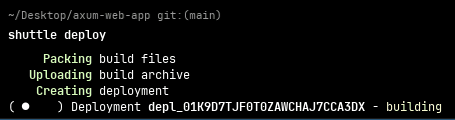 Shuttle deploy
You can read the Shuttle documentation for more information about how to deploy a Rust web app to Shuttle.
Common Pitfalls & Trade-offs#
Async Complexity#
There's a common misconception that async is always necessary. Jim Blandy's benchmarks show context switching costs are measured in nanoseconds. For most applications, the majority of CPU time should be spent executing business logic, not managing async overhead. If your application is compute-heavy rather than I/O-bound, a synchronous framework might be simpler and just as fast.
Choice Paralysis#
Unlike Go's "batteries included" philosophy, Rust requires upfront decisions about your stack. This can feel overwhelming initially. The good news is that the ecosystem has matured significantly. Community consensus exists around solid options for backend frameworks, databases, templating engines, and deployment strategies. The frameworks I've recommended here are all production-ready and well-supported, making it easier for developers to implement their projects with confidence.
Frontend Maturity#
The backend story is excellent. Rust backend frameworks are production-ready today. The frontend WASM story is still maturing. Yew has "grown quite nicely" according to its maintainers, but developers should be cautious about using Rust WASM frameworks like Yew or Perseus for production applications unless you've validated they meet your specific needs.
The pragmatic approach is to use what works today: HTMX with server side rendering, or a mature JavaScript framework like React for your frontend while leveraging Rust's strengths on the backend to handle API requests and create robust server-side logic.
Putting It All Together#
Here's the stack I recommend for most Rust web applications:
Backend: Axum for its balance of power and approachability.
Database: SQLx with PostgreSQL for flexibility and reliability.
Templating: Tera for server-side rendering.
Frontend: Start with server side rendering and HTMX. Add WASM later only if you have a specific need.
Deployment: Shuttle for the fastest path to production, with deployment in five minutes using shuttle deploy.
This stack is production-ready, well-documented, and supported by active communities.
Conclusion#
Rust web development requires more upfront research than alternatives like Go or Python. You're making architectural decisions that other ecosystems have made for you. But the payoff is significant: exceptional performance, memory safety guarantees, and predictable runtime behavior. Developers who invest the time to learn Rust will create more efficient and reliable web applications.
The ecosystem offers mature, well-documented options for backend development. Choose tools based on your actual requirements rather than hype. Start simple and add complexity only when you need it.
The performance and reliability benefits of Rust pay off for production applications, especially when you're building microservices or processing large amounts of data. The initial investment in learning and choosing your stack will pay dividends as your application scales.
Get Started#
This single command scaffolds a working Axum application with a proper project structure. From there, you're minutes away from a deployed web service. You can then implement your business logic and create the features your application needs.